Stream Deck as an Agentic Productivity Tool
In Getting Out of Worktree Hell I wrote about stable worktrees: a fixed set of six, wt1 through wt6, each tied to its own cmux session. Same names everywhere — terminal, Chrome tab group, piece of work.
That fixed the chaos. It did not fix the switching. When Claude is running across those workspaces and I’m in a browser reviewing a PR, jumping back still means hunting the right tab, the right session, the right place where something is waiting for me.
Not just for streamers
Elgato’s Stream Deck shows up in every streamer desk photo. Lights, scenes, mute. Fine. But a grid of programmable keys with live status is also a pretty good surface for an agentic workflow.
You are not one person at one terminal anymore. You are coordinating several agents, several worktrees, several “please pick one” prompts. A physical deck is a control panel for that — status at a glance, one tap to jump, no ⌘-Tab spelunking.
Worktrees on the deck
Gonzalo Serrano built streamdeck-cmux, and it maps straight onto the stable-worktree setup.
Each key is a cmux workspace. Background color matches the sidebar. A lighter key is the one you are on. An orange bar means it needs input. Pink means Claude is running. Progress and working directory show up on the key itself.
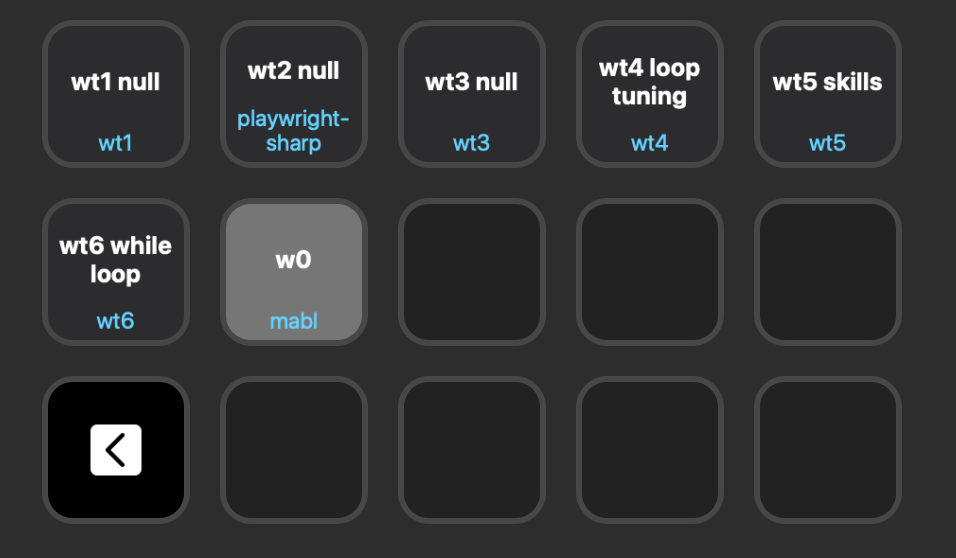
Press a key and you land on that workspace — the same wt1–wt6 I already use as a WIP limit, now one tap away from whatever I was reading in the browser.
Answering Claude from the keys
Claude Code asks a lot of multiple-choice questions. Leave the keyboard, find the terminal, read the options, type a number. Fine once. Annoying when six worktrees are asking at once.
So I built streamdeck-claude-answer. When Claude asks, the question lands on the deck. Top-left tells you which directory is asking. The numbered keys are the options. Press one, the answer goes back, and the deck returns to whatever profile you were on.
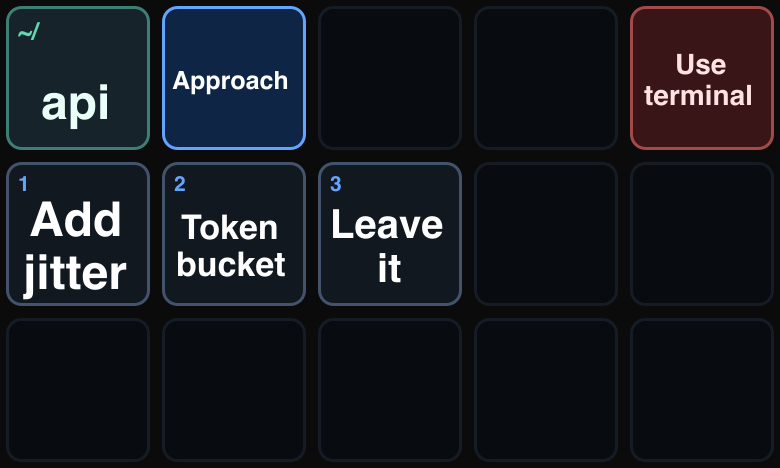
No network daemon. Claude writes a question file, the plugin watches it, you press a key, an answer file goes back. That is the whole loop.
Will it stick?
I don’t know how well this will integrate into my daily workflow. Buttons are fun for a week and then they collect dust. But the problem is real — too many agents, too many waiting prompts — and a deck that shows status and takes answers feels worth trying.
I’ll give it a shot.
Don’t stop coding!