Meet Playwright Claude Mod, Your Test Results Inside Claude Code

Claude just ran your Playwright tests. Did they pass?
To answer that, you scroll. Up and up through terminal output, looking for a red line. If you use VS Code, you know there is a better way: the Playwright extension shows every test in a panel, with a check or a cross next to it.
I wanted that inside Claude Code. So I built Playwright Claude Mod.
What is a Claude mod?
It’s a Claude Code plugin made of function hooks. It runs only in Claude Code.
It all started with a prompt: “Learn about claude mods”. Then: “I want to see Playwright results in a side panel, just like the VS Code Playwright extension.”
Somewhere in the middle of the build I was typing “it’s working!” and “this is awesome!” in the chat. Not my most professional moment, I know.
What does it do?
When Claude runs playwright test, the panel updates by itself. Pass or fail per test, how long each one took, and the first lines of each error. It changes nothing in Claude’s command. It just watches.
In the demo, I asked Claude: “I think something is broken with the add items to the todo list, can we run the tests?” Claude ran them, and the panel filled in: “Claude’s run: 9 passed.” Then I clicked “Adding Todos › should add single todo”, it said “Running…”, and then “1 passed”.
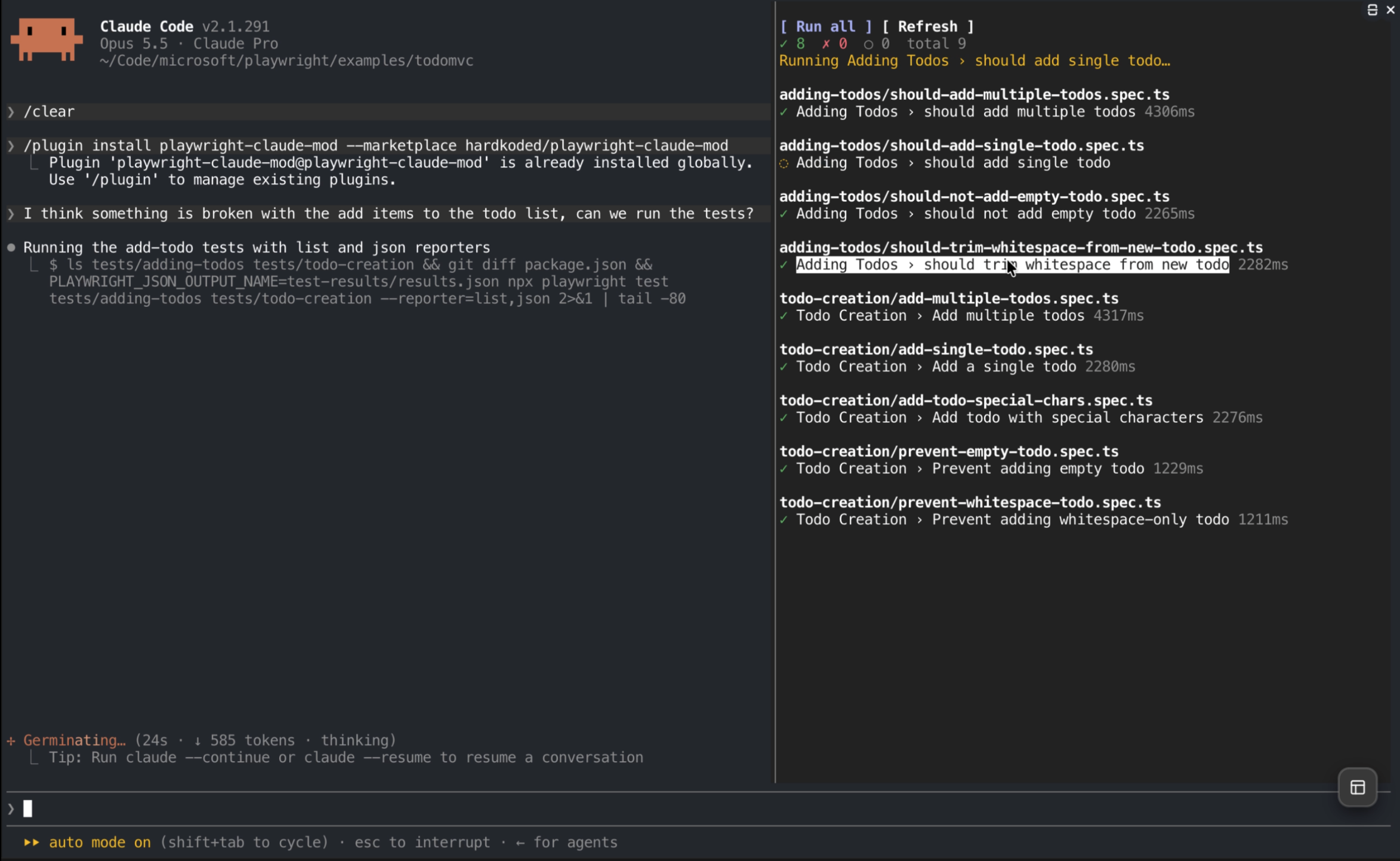
You can drive it too:
/playwrightopens the panel./playwright <folder>opens it for another project.- Run all (
r) runs the whole suite. Refresh (l) reloads the test list. - Click a test name to run only that test.
- Partial runs (one file, one test) update only those tests. The rest keep their last result.
- No json reporter in your config? The panel shows a Fix button (
f). Claude adds the reporter, and you review the edit.
Wait, the mod doesn’t run the tests?
It can, when you press a button. But that was not the plan at first.
My first idea was the obvious one: the mod runs the tests and shows the results. Then I flipped it. The panel follows what Claude does. Claude runs npx playwright test like it always does, and the mod reads the json report.
I tested all of this against Microsoft’s playwright/examples/todomvc.
Dogfooding found the real problems
Using it for real found things no plan would.
Claude sometimes forced --reporter list, which drops the json report. So the mod adds a short note to Claude’s system prompt asking it to keep json, and it also reads whatever file PLAYWRIGHT_JSON_OUTPUT_NAME points to.
The pane stayed hidden in a narrow terminal. My cmux side panel took half the width, and the pane needs 144 columns. Now, when there’s no room, the status line shows the result and points you to /playwright.
And the html reporter hung the first full run after a failure.
Then a code review found more: stale results shown as new, double runs from two quick key presses, and the hook firing on the wrong commands. A git commit -m "fix playwright test" is not a test run. 😜
Stale reports are handled now. If a run writes no new report, the panel keeps the old results and tells you so.
Known limits
It’s version 0.1.1, so let’s be honest:
- It shows the first project only (chromium, not firefox too).
- Reports over 4 MiB can’t be read.
- Background runs are not picked up. Press Run all.
- The html reporter can hang runs on failure. Use
['html', { open: 'never' }].
How to install
Type this at the Claude Code prompt:
/plugin install playwright-claude-mod --marketplace hardkoded/playwright-claude-mod
Then add a json reporter to playwright.config.ts, or press f in the panel and let Claude do it:
reporter: [['list'], ['json', { outputFile: 'test-results/results.json' }]],
Final words
Now I can see what Claude’s test run did without scrolling. That’s it. That’s the whole idea.
It’s free, open source, and MIT. Try it, break it, and tell me what’s missing in the repo.
Don’t stop coding!